
An Architectural Overview of UNIX Network Security
The goal of this paper is to present my concept of a UNIX network security architecture based on the Internet connectivity model and Firewall approach to implementing security. This paper defines several layers of a firewall, which depict the layers of vulnerability. This paper also provides some subjective comments on some of the most widely known tools and methods available to protect UNIX networks today, plus a brief discussion of the threat and the risk.
The list of tools and methods that I present in this paper were chosen loosely on the basis of the following: (a) My attempt to find at least one, maybe several examples of a tool or method designed to address a part of the architectural model (some duplication or overlap is accepted); (b) my preference to discuss tools that are well-known and/or part of the public domain (this is not a strict rule, although I did not purposely seek out commercial products); and (c) I hoped to find tools that had a recent paper written by the tools' author, for the reader to use as detailed reference beyond the scope of this document.
Nothing in this paper should be construed as a product endorsement. I apologize in advance to the authors of these tools and methods; since I am only presenting a brief overview, I cannot do justice to a comprehensive description of them. I also apologize to any authors whom I may have left out of this discussion; it was not intentional. The reader should check the availability information that accompanies each tool and obtain additional information prior to proceeding with any plans or implementation. Of course, there is no warranty expressed or implied in this paper.
2. Risk, Threat, and Vulnerability
This section presents a general overview of the risk and the threat to the security of your network. These are general statements that apply to almost every network. A complete analysis of your network's risk, threat, and vulnerability should be done in order to assess in detail the requirements of your own network.
2.1 Risk
The risk is the possibility that an intruder may be successful in attempting to access your local-area network via your wide-area network connectivity. There are many possible effects of such an occurrence. In general, the possibility exists for someone to:
- READ ACCESS. Read or copy information from your network.
- WRITE ACCESS. Write to or destroy data on your network (including planting trojan horses, viruses, and back-doors).
- DENIAL OF SERVICE. Deny normal use of your network resources by consuming all of your bandwidth, CPU, or memory.
2.2 Threat
The threat is anyone with the motivation to attempt to gain unauthorized access to your network or anyone with authorized access to your network. Therefore it is possible that the threat can be anyone. Your vulnerability to the threat depends on several factors such as:
- MOTIVATION. How useful access to or destruction of your network might be to someone.
- TRUST. How well you can trust your authorized users and/or how well trained are your users to understand what is acceptable use of the network and what is not acceptable use, including the consequences of unacceptable use.
2.3 Vulnerability
Vulnerability essentially is a definition of how well protected your network is from someone outside of your network that attempts to gain access to it; and how well protected your network is from someone within your network intentionally or accidentally giving away access or otherwise damaging the network.
Motivation and Trust (see Threat, section 2.2) are two parts of this concern that you will need to assess in your own internal audit of security requirements and policy, later I will describe some references that are available to help you start this process.
The rest of this paper is a presentation of my concept of the architectural model of UNIX network security (the focus of this paper). This is geared toward connectivity to the Internet (or Internet Protocol connectivity in general), employing the FIREWALL method of reducing vulnerability to the risks and the threat.
3. UNIX Network Security Architecture
For each of the layers in the UNIX Network Security Architecture (UNIX/NSA) model below, there is a subsection that follows that gives a brief description of that layer and some of the most widely used tools and methods for implementing security controls. I am using the ISO/OSI style of model since most people in the UNIX community are familiar with it. This architecture is specifically based on UNIX Internet connectivity, but it is probably general enough to apply to overall security of any network methodology. One could argue that this model applies to network connectivity in general, with or without the specific focus of UNIX network security.
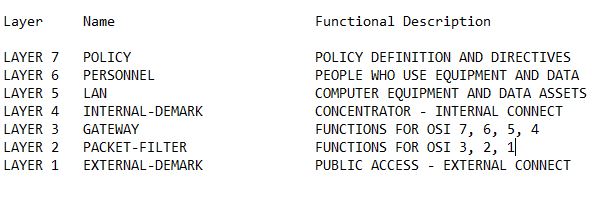
The specific aim of this model is to illustrate the relationship between the various high and low level functions that collectively comprise a complete security program for wide-area network connectivity. They are layered in this way to depict (a) the FIREWALL method of implementing access controls, and (b) the overall transitive effect of the various layers upon the adjacent layers, lower layers, and the collective model. The following is a general description of the layers and the nature of the relationship between them. After this brief discussion of what each layer is, the next section of this paper will discuss examples of common methods and tools used to implement some of your options at each level, or at least try to tell you where to find out how to get started. Note that there may be some overlap between the definitions of the various levels, this is most likely between the different layers of the FIREWALL itself (layers 2 and 3).
The highest layer [ 7 - POLICY ] is the umbrella that the entirety of your security program is defined in. It is this function that defines the policies of the organization, including the high level definition of acceptable risk down to the low level directive of what and how to implement equipment and procedures at the lower layers. Without a complete, effective, and implemented policy, your security program cannot be complete.
The next layer [ 6 - PERSONNEL ] defines yet another veil within the bigger umbrella covered by layer 7. The people that install, operate, maintain, use, and can have or do otherwise have access to your network (one way or another) are all part of this layer. This can include people that are not in your organization, that you may not have any administrative control over. Your policy regarding personnel should reflect what your expectations are from your overall security program. Once everything is defined, it is imperitive that personnel are trained and are otherwise informed of your policy, including what is and is not considered acceptable use of the system.
The local-area network layer [ 5 - LAN ] defines the equipment and data assets that your security program is there to protect. It also includes some of the monitor and control procedures used to implement part of your security policy. This is the layer at which your security program starts to become automated electronically, within the LAN assets themselves.
The internal demarcation layer [ 4 - INTERNAL DEMARK ] defines the equipment and the point at which you physically connect the LAN to the FIREWALL that provides the buffer zone between your local- area network (LAN) and your wide-area network (WAN) connectivity. This can take many forms such as a network concentrator that homes both a network interface for the FIREWALL and a network interface for the LAN segment. In this case, the concentrator is the internal demarcation point. The minimum requirement for this layer is that you have a single point of disconnect if the need should arise for you to spontaneously separate your LAN from your WAN for any reason.
The embedded UNIX gateway layer [ 3 - GATEWAY ] defines the entire platform that homes the network interface coming from your internal demark at layer 4 and the network interface going to your packet filtering router (or other connection equipment) at layer 3. The point of the embedded UNIX gateway is to provide FIREWALL services (as transparent to the user or application as possible) for all WAN services. What this really is must be defined in your policy (refer to layer 1) and illustrates how the upper layers overshadow or are transitive to the layers below. It is intended that the UNIX gateway (or server) at this layer will be dedicated to this role and not otherwise used to provide general network resources (other than the FIREWALL services such as proxy FTP, etc.). It is also used to implement monitor and control functions that provide FIREWALL support for the functions that are defined by the four upper ISO/OSI layers (1-Application, 2-Presentation, 3- Session, 4-Transport). Depending on how this and the device in layer 2 is implemented, some of this might be merely pass-thru to the next level. The configuration of layers 3 and 2 should collectively provide sufficient coverage of all 7 of the functions defined by the ISO/OSI model. This does not mean that your FIREWALL has to be capable of supporting everything possible that fits the OSI model. What this does mean is that your FIREWALL should be capable of supporting all of the functions of the OSI model that you have implemented on your LAN/WAN connectivity.
The packet filtering layer [ 2 - FILTER ] defines the platform that homes the network interface coming from your gateway in layer 3 and the network interface or other device such as synchronous or asynchronous serial communication between your FIREWALL and the WAN connectivity at layer 1. This layer should provide both your physical connectivity to layer 1 and the capability to filter inbound and outbound network datagrams (packets) based upon some sort of criteria (what this criteria needs to be is defined in your policy). This is typically done today by a commercial off-the- shelf intelligent router that has these capabilities, but there are other ways to implement this. Obviously there is OSI link-level activity going on at several layers in this model, not exclusively this layer. But, the point is that functionally, your security policy is implemented at this level to protect the overall link- level access to your LAN (or stated more generally; to separate your LAN from your WAN connectivity).
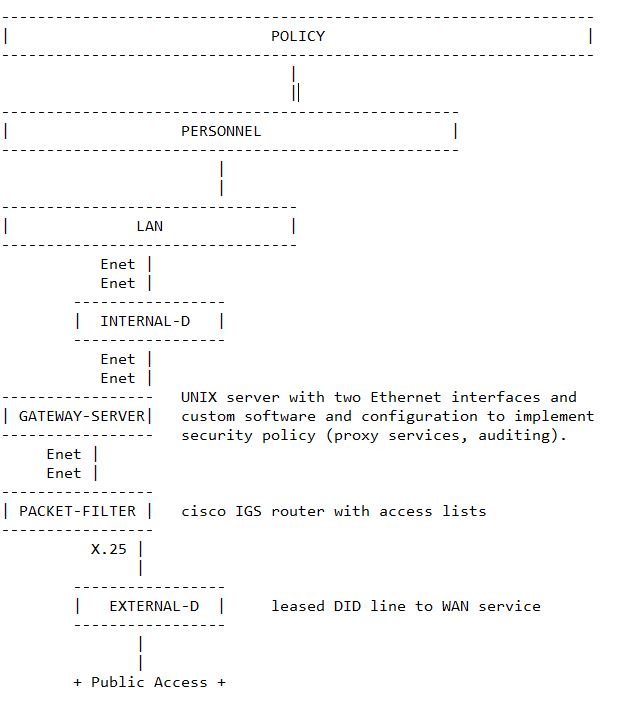
The external demarcation layer [ LAYER 1 ] defines the point at which you connect to a device, telephone circuit, or other media that you do not have direct control over within your organization. Your policy should address this for many reasons such as the nature and quality of the line or service itself and vulnerability to unauthorized access. At this point (or as part of layer 2) you may even deploy yet another device to perform point to point data link encryption. This is not likely to improve the quality of the line, but certainly can reduce your vulnerability to unauthorized access. You also need to be concerned about the dissemination of things at this level that are often considered miscellaneous, such as phone numbers or circuit IDs. Illustration of the UNIX/NSA Model
3.1 PUBLIC or NON-PRIVATE CONNECTIVITY
This layer of the model characterizes all external physical connectivity to your network. This normally includes equipment and telephone lines that you do not own or do not have control over. The point of illustrating this is to show this part of the connectivity as part of the overall model. At some point at this layer, equipment that you do own or have control of will connect to the external or public network. Your own policy and implementation must take the dynamics of this connectivity into account.
3.2 ROUTER (FIREWALL PHYSICAL LAYER)
This layer of the model depicts the point at which your physical connectivity and your data stream become one. Without going into hysterics about all of what a router is and does; the point is that at this layer, your electrical connectivity, which contains encapsulated data in some form, becomes information. Your router will decode the electrical signals from the physical connectivity and turn it into packets of encapsulated data for any one of various networking protocols. Within this packet of information is contained the source address, destination address, protocol ID, the datagram itself, etc.
Many routers available today include the capability to create access control lists (ACL) for either one or both of the outgoing and the incoming data interfaces [1][5]. This normally includes the capability to filter out or allow in packets based upon source address, destination address, protocol (such as TCP, UDP, ICMP, etc.) and specific port numbers (TCP and UDP). This provides you the flexibility to design your own network access control policy, enforced at the router, before access to your internal network resources is required or granted. In this way, routers alone are often used to provide the firewall functionality.
While the router ACL capability offers a big advantage, it should not be your only protection because, basically the router only provides protection at the first three levels of the OSI model (Physical, Data Link, and Network layers). The rest of the layers of this firewall model discuss ways to address functional security of the other four OSI layers (Transport, Session, Presentation, and Application).
Availability: I only have personal experience with CISCO routers, however I've been told that Wellfleet and Proteon routers also have this feature. There may be other vendors as well, but they probably all implement it a little differently.
3.3 DUAL-HOMED UNIX GATEWAY SERVER (FIREWALL LOGICAL LAYER)
This layer of the model illustrated the point at which your various IP packets (to and from the router) are used by the network operating system (such as TCP/IP under UNIX) to provide the services identified in the upper four layers of the OSI model. Of course, this UNIX server is actually doing work at the bottom three OSI layers also, in order to communicate with: (a) the router on one side of the server, and (b) the local-area network on the other side of the server.
At this point the router is already implementing your security policy for the bottom three OSI layers, now it's up to your dual- homed [10] UNIX server (acting as a gateway) to implement your security policy relating to functions of the network for the upper four OSI layers. This can mean a lot of things. Depending on what your security policy says you are supposed to enforce, what you do at this point varies. The following tools and methods are example of some of the tools and methods (functionality) available today:
3.3.1 TCP Wrapper
The "TCP WRAPPER" tool [2] provides monitoring and control of network services. Essentially, what happens is that you configure inetd on your dual-homed gateway to run the TCP WRAPPER software whenever certain services (ports) are connected to. Depending on how you configure TCP WRAPPER, it will then LOG information about the connection and then actually start the intended SERVER program that the connection was intended for. Since you have the source to the tool, you can modify it to do more depending on what your needs are. For example, you may want TCP WRAPPER to connect the user to a proxy service instead of the actual program, then have your proxy software handle the transaction in whatever way your security requirements demand.
Availability: This is available from several sources, but to ensure that you get the most recent copy that CERT has verified, you should use anonymous FTP to retrieve it from cert.org in ~/pub/tools/tcp_wrappers/tcp_wrappers.*.
3.3.2 SOCKS library and sockd
The "sockd" and "SOCKS Library" [3] provide another way to implement a "TCP Wrapper." It is not intended to make the system it runs on secure, but rather to centralize ("firewall") all external internet services. The sockd process is started by inetd whenever a connection is requested for certain services, and then only allows connections from approved hosts (listed in a configuration file). The sockd also will LOG information about the connection. You can use the Socks Library to modify the client software to directly utilize the sockd for outgoing connections also, but this is described as very tedious and of course requires you to have the source to those client programs.
Availability: The socks package, which in addition to including both the daemon and the library, has a pre-modified FTP client and finger client; it is available via anonymous FTP from s1.gov in ~/pub as socks.tar.Z. Contact the authors for more information. David Koblas ([email protected]) or Michelle R. Koblas ([email protected]).
3.3.3 Kernel_Wrap for SunOS RPC via Shared Libraries
Essentially this is a wrapper for SunOS daemons that use RPC [4], such as portmap, ypserv, ypbind, ypupdated, mountd, pwdauthd, etc. To utilize this, you must have SunOS 4.1 or higher and must have the capability to rebuild your shared libraries (but, you don't need the source to your entire system). Essentially what happens is that you modify the function calls that the kernel uses to establish RPC connections, such as accept(), recvfrom() and recvmsg(). Since these calls are maintained in the shared libraries, you have access to modify them without rewriting the kernel.
Availability: The secured C library package to implement this is available via anonymous FTP from eecs.nwu.edu in ~/pub/securelib.
3.3.4 Swatch
Simple WATCHER [6] is really two things, it is a program used to parse through the myriad of LOG data generated by the various security programs, in particular "syslog." But, it's more than that. It is fully configurable with triggers (actions), so that while it is continuously monitoring the LOG in "real-time," it can take actions based upon certain high-priority events that you tell it to watch for. To get full use of this, you will need to modify your network service daemons such as ftpd and telnetd so that enhanced logging is added to syslog, to feed SWATCH.
Availability: The SWATCH source and documentation is available via anonymous FTP from sierra.stanford.edu in ~/pub/sources.
3.3.5 Controlled Access Point (CAP)
This is more of a method or protocol definition than a specific product. CAP [7] provides a network mechanism intended to reduce the risk of: password guessing, probing for well-known accounts with default passwords, trusted host rlogin, and password capture by network snooping. It is really a design for a variation or enhancement to the general firewall approach to connecting two or more networks. In the paper describing this there is an example of two local nets, one a secure segment with an authentication service, and the other an unsecure segment. Both communicate with each other via a CAP, while there is a router for communication to public networks connected on the unsecure side of the CAP. The CAP is essentially a router with additional functionality to detect incoming connection requests, intercept the user authentication process, and invoke the authentication server.
Availability: Unknown. Contact the authors for more information. J. David Thompson ([email protected]) and Kate Arndt ([email protected]).
3.3.6 Mail Gateway
This is more of a procedure than a software package (although there are packages designed just to do this). I included this to maintain continuity with what I'm trying to illustrate in this paper. This really should be applied to all network services that require external connectivity (meaning any communication over non-private or non-secure channels). In the simplest implementation of this, you configure your router to filter packets so that all mail traffic (SMTP protocol for example) is only allowed to and from one host, the "Mail Gateway." Likewise, your DNS and MTA software will need to be configured for this as well.
3.3.7 Tty Wrapper
This is one of my pet ideas. I have not seen something like this around, and I'll probably never have time to develop it. But, essentially this would be like "TCP Wrapper," only it is designed specifically for serial communications. After that, we will need a "Pseudo-Tty Wrapper," (something more than just filtering out the telnet port) but that is for another day.
3.3.8 HSC-Gatekeeper
The HSC-Gatekeeper from Herve' Schauer Consultants [8], is a complete solution to both layers 1 and 2 of this firewall model. It consists of a thorough firewall methodology and authentication server, providing pass-thru FTP and TELNET services. The author (Herve Schauer) noted that HSC-Gatekeeper is alone to be able to offer fully transparent authentication for these services. I have not had personal experience with HSC's products, so I cannot make a conclusive statement about it other than to comment that the description of it in HSC's paper "An Internet Gatekeeper" (available in the USENIX Proceedings) depicts it (IMHO) as a very comprehensive solution.
Availability: For more information, contact Herve Schauer via e-mail at [email protected].
3.3.9 AT&T Inet
Since I discussed HSC's firewall solution, I thought it only fair to mention AT&T's INET Gateway. For a complete description of AT&T's internal solution, you should read Bill Cheswick's paper [9] "The Design of a Secure Internet Gateway." For additional information, contact the author via e-mail at [email protected]. I do not believe that AT&T is in the business of selling this solution to anyone, but the paper describes in good detail how it was done. It should provide the puritan firewaller additional depth to the problems and possible solutions to an Internet firewall approach.
3.4 COMPUTERS ON THE LOCAL-AREA NETWORK
This layer of the model depicts the place where you you are potentially at the greatest risk. The previous layers discussed ways to protect access to this layer of the network. This layer includes all of you local-area network, workstations, file servers, data bases, and other network resources. This is also the point at which your user community sits at their desks and use the network.
There are several things to be concerned about here, access to this layer in the first place notwithstanding. Just because you think you have protected and may be monitoring access to this layer within the previous layers, does not mean that use of computers and other resources within your local-area network should become a free for all. Again, this depends on what you identify in your own particular security policy but, at this layer you should do some routine checking for possible breaches of your firewall that would leave its mark at this layer and pay close attention to effective password handling, etc. This is also the layer of this model at which you want to concern yourself with training your users, after all this is where they can potentially make their mistakes (and harm your network).
3.4.1 Computer Oracle and Password System (COPS)
COPS is a UNIX security status checker. Essentially what it does is check various files and software configurations to see if they have been compromised (edited to plant a trojan horse or back door), and checks to see that files have the appropriate modes and permissions set to maintain the integrity of your security level (make sure that your file permissions don't leave themselves wide open to attack/access).
Many vendors of UNIX are now bundling a security status checker with the OS, usually under the nomenclature of a "C2" or "trusted system." You may still find that this package has more features than your canned package. Compare them.
Additional Comments: The current version of COPS (1.04) makes a limited attempt to detect bugs that are posted in CERT advisories. Also, it has an option to generate a limited script that can correct various security problems that are discovered. Dan also offers a quick hint that should easily get you started using COPS. After you have unarchived the COPS package, perform the following steps: './reconfig', 'make', and './cops -v -s . - b bit_bucket'. -- There is a lot of README documentation included if you need more help.
Availability: COPS can be retrieved via anonymous FTP from cert.org in ~/pub/tools/cops.
3.4.2 Chkacct
Chkacct [11] is a COPS for the ordinary user. This tool is made available to the users to run, or it is run for them once per day. It will do an integrity check on the status of files in their own account and then mail them the results (such as "Dear user: Your .rhosts file is unsafe"). This package can help make your users more aware of security controls and raise their level of participation in the program.
Availability: Chkacct is distributed with the COPS package (>= COPS 1.04), for additional information contact [email protected].
3.4.3 Crack
Crack helps the security administrator identify weak passwords by checking for various weaknesses and attempting to decrypt them. If Crack can figure out your password, then you must choose a better password. It is very likely that a determined intruder will be able to get the password too (using similar techniques, or the Crack program itself, since it is publicly available).
Availability: Crack is available via anonymous FTP from cert.org in ~/pub/tools/crack/crack_4.1-tar.Z.
3.4.4 Shadow
The shadow password suite of programs [12] replaces the normal password control mechanisms on your system to remove the encrypted password from the publicly readable file /etc/passwd and hides them in a place that only this program has permission to read. It consists of optional, configurable components, provides password aging to force users to change their passwords once in awhile, adds enhanced syslog logging, and can allow users to set passwords up to a length of sixteen characters.
Many vendors of UNIX are now bundling a shadow password suite with the OS, usually under the nomenclature of a "C2" or "trusted system." You may still find that this package has more features than your canned package. Compare them.
Availability: Shadow is available from USENET archives which store the comp.sources.misc newsgroup. Distribution is permitted for all non-commercial purposes. For more information contact the author, John F. Haugh III ([email protected]).
3.4.5 Passwd+
Passwd+ is a proactive password checker [13] that replaces /bin/passwd on your system. It is rule-based and easily configurable. It prevents users from selecting a weak password so that programs like "CRACK" can't guess it, and it provides enhanced syslog logging.
Many vendors of UNIX are now bundling a proactive password checker with the OS, usually under the nomenclature of a "C2" or "trusted system." You may still find that this package has more features than your canned package. Compare them.
Availability: Passwd+ (developed by Matt Bishop) is available via anonymous FTP from dartmouth.edu in ~/pub/passwd+tar.Z.
3.4.6 Audit
Audit is a policy-driven security checker for a heterogeneous environment [14]. It is fully configurable so that you can set up Audit to exactly match your site's security policy. This program functionally does what COPS is intended to do, but does not hard-code your policy decisions for you the way that COPS does.
Many vendors of UNIX are now bundling an auditing subsystem with the OS, usually under the nomenclature of a "C2" or "trusted system." You may still find that this package has more features than your canned package. Compare them. One particular subject to note is that most (IMHO) vendors auditing subsystems only collect and regurgitate tons of raw data, with no guidance and assistance for using that information. They leave that up to you. The Audit and/or Swatch tools are probably better.
Availability: The final version of Audit will eventually be posted to USENET. However, the beta release will only be made available on a limited basis, to larger, heterogeneous sites. If your interested in participating in the beta test, send e-mail to the auther, Bjorn Satdeva ([email protected]).
3.4.7 Miro
Miro [14] is a suite of tools for specifying and checking security contraints (like COPS and Audit), including a couple programming languages. It is general because it is not tied to any particular OS, and it is flexible because security administrators express site policies via a formal specification language. It is easy to extend or modify a policy by simply augmenting or changing the specification of the current policy.
Availability: Miro is the product of a large research project, and to understand it you need more than the paragraph I've written above. For more information about the Miro project send e-mail to ([email protected]), there is even a video available. The authors Ph.D thesis, as well as the sources for the Miro tools, are available via anonymous FTP from ftp.cs.cmu.edu. When you connect there, type "cd /afs/cs/project/miro/ftp" and "get ftp-instructions"; this will explain how to get the thesis and/or software.
3.5 ADDITIONAL SECURITY ENHANCEMENTS
The tools described in firewall layers {1...4} (sections 3.1 to 3.4) above, are what I consider part of a "base" set of tools and functional requirements for general security administration. The tools and methods described in this section are additional measures that can be combined with or added to your overall security program at any of the other levels.
3.5.1 One-time Password Key-Card
Since reusable passwords can be captured and used/reused by intruders, consider a "one-time password" scheme. One-time passwords can be implemented using software-only solutions or software/hardware solutions, and there are several commercial products available. The following is an example of what CERT uses. Each user is assigned a "Digital Pathways" key-card (approximately $60 per user). When you enter your PIN code, it supplies a password that is good only one time. The only other piece to this, is software that replace the login shell on your "firewall" server.
Availability: The source-code for this shell is based on code from the key card vendor and is currently not available to the public domain via anonymous FTP. For additional information about this, send e-mail to ([email protected]).
3.5.2 Privacy Enhanced Mail (PEM)
PEM is a RSA-based encryption scheme that encrypts sensitive information, but more than that it checks for message integrity and non-repudiation of origin, so that the originator cannot deny having sent the message. PEM is actually a protocol that is designed to allow use of symmetric (private-key) and asymmetric (public-key) cryptography methods. In this example, Trusted Information Systems, Inc. (TIS) has implemented a PEM package using the public-key technique together with the Rand MH Message Handling System (version 6.7.2). TIS/PEM libraries [16] can be adapted for implementation of non-mail applications as well.
Availability: TIS/PEM is a commercially available product, for additional information send e-mail to ([email protected]).
3.5.3 Kerberos
Kerberos is a DES-based encryption scheme that encrypts sensitive information, such as passwords, sent via the network from client software to the server daemon process. The network services will automatically make requests to the Kerberos server for permission "tickets." You will need to have the source to your client/server programs so that you can use the Kerberos libraries to build new applications. Since Kerberos tickets are cached locally in /tmp, if there is more than one user on a given workstation, then a possibility for a collision exists. Kerberos also relies upon the system time to operate, therefore it should be enhanced in the future to include a secure time server (timed is not appropriate). There are two versions of Kerberos, one for OSF ported by HP, and one BSD-based developed by the author.
Availability: Kerberos is distributed via anonymous FTP from athena-dist.mit.edu in ~/pub/kerberos or ~/pub/kerberos5.
3.5.4 Private-Key Certificates
This is not really a product, but rather a design proposal [17] that is an alternative method to PEM for adding network security to applications such as mail. Simply put, it uses the public-key style of implementation with private-key cryptography. It can be adapted to different types of applications and it is boilerplate so that you can essentially plug-in any encryption algorithm. This is designed so that public-key protocols no longer have to rely on public-key encryption.
Availability: Unknown. For more information, contact Don Davis, at Geer Zolot Assoc., Boston, MA (formerly of Project Athena at MIT). His paper "Network Security via Private-Key Certificates" better describes this techique.
3.5.5 Multilevel Security (MLS)
After you've done everything else (above) to make your network secure, then MLS will probably be one of your next logical steps. That doesn't mean you have to wait until you've done everything else before implementing MLS, it's just (IMHO) that you would be wasting your time to go to the n'th degree before covering the fundamentals. However, if you are just now deciding to which variant of the UNIX operating system to buy, consider buying an MLS variant now. After you configure it to manage your security policy, go back through layers {1...4} to see what you might add to make it more secure in a networked environment. Many UNIX vendors are now shipping or preparing to ship a MLS version. A couple examples that immediately come to mind is SecureWare CMW+ 2.2 (based on A/UX or SCO ODT 1.1) and AT&T USL System V-Release 4-Version 2-Enhanced Security (SVR4.2ES).
For additional information regarding MLS implementations within the Department of Defense (DoD), contact Charles West at (703) 696-1891, Multilevel Security Technology Insertion Program (MLS TIP), Defense Information Systems Agency (DISA).
For additional information regarding SecureWare CMW+, send e-mail to [email protected]. For additional information regarding AT&T USL SVR4.2ES, send e-mail to [email protected].
3.5.6 File Encryption
Users should get into the habit of encrypting sensitive files whenever they are stored in a public place or transmitted via public communication circuits. File encryption isn't bulletproof, but it is better than clear text for sensitive information. The UNIX crypt utility is the least secure of these tools, since it can be broken using well-known decryption techniques. The UNIX des utility (US export restriction apply) is more secure. It has not been known to be broken, however DoD does not sanction its use for transmitting classified material. A new UNIX tool PGP 2.2 is available (uses RSA encryption), however there may be licensing issues to be concerned with.
3.5.7 Secure Programming Methods
Programmers can assist in the effort of security by reducing the chance that a potential intruder can exploit a hole or bug that is coded into locally developed software. There is probably a lot that can be said about this, and their are probably many books on the subject somewhere. But, here are some common recommendations: (a) Never create a SETUID shell script. There are well-known techniques used by intruders to gain access to a shell program that is running as root; (b) List the complete file name, including the full path in any system() or popen() call; and (c) Since there is no reason for users to have read access to a SETUID file (or any exectuble for that matter), set permissions to 4711 (SETUID) or 711 (Non-SETUID).
3.5.8 Counterintelligence
To extend your security program to seek out, identify, and locate intruders; you may want to modify some of the security tools (especially those proxy service daemons and event-driven auditors) to trace intruders back to their source, and otherwise maintain logs of data on intrusion attempts. This information can prove vital in taking an offensive stance against security break-in's and can help prosecute offenders.
3.5.9 Other Possibilities
Depending on your requirements you might look into specialized solutions such as Compartmented Mode Workstations (CMW), end-to-end Data Link Encryption (STU-III, Motorola NES, and XEROX XEU are examples), and TEMPEST. The NCSC (Rainbow Series) and ITSEC specifications can help you define what level of need you have for security and help lead you to additional types of solutions.
3.6 SECURITY POLICY
Everything discussed in layers {1...5} (sections 3.1 to 3.5) above involve specific things you can do, tools and techniques to implement, to address a particular area or "hole" in security. Your SECURITY POLICY is what ties all of that together into a cohesive and effective SECURITY PROGRAM. There are many diverse issues to consider when formulating your policy, which alone is one of the biggest reasons why you must have one:
- What are the functional requirements of your network?
- How secure do you need to be? What needs to be protected?
- How will you handle incident reporting and prosecution?
- What does the law require you to do? What about privacy? Since break-ins often occur via multiple hops on computers throughout the US and the rest of the world, you will need to consider a variation of federal, state, local, as well as foreign laws.
- Make security a dedicated and deliberate effort.
- User training and security awareness.
- What is considered acceptable use for users? Do the users understand what it is they are permitted to do and what it is they are not permitted to do?
- What is considered acceptable use for system administration staff? Is using Crack to test passwords okay? Is giving friends outside the organization accounts okay?
- Maintain a working relationship with the Computer Emergency Response Team (CERT) at Carnegie Mellon University (CMU) and your Forum of Incident Response and Security Teams (FIRST) regional representative "CERT" team.
- PLUS a myriad of different issues too numerous to go into in a summary paper.
By answering these questions you determine what packages and methods in layers {1...5} (or their equivalent) that you want to implement, and in what ways you want to modify or configure them. "A security policy is a formal specification of the rules by which people are given access to a computer and its resources." (and to extend that to say...a network and its resources). Whatever tools you install to help you maintain the security of your network and monitor it, they must be configured to implement YOUR POLICY, or else they are not doing the whole job that needs to be done. Therefore, you must first have a POLICY.
For additional help in the area of policy development, contact [email protected]. They can direct you to useful documentation on the subject and guide you to your FIRST regional CERT team representative. A good starting point is Request For Comments (RFC) 1244 "Site Security Handbook" (96 pages), which is available via anonymous FTP from numerous RFC archive sites (for example: nic.ddn.mil).
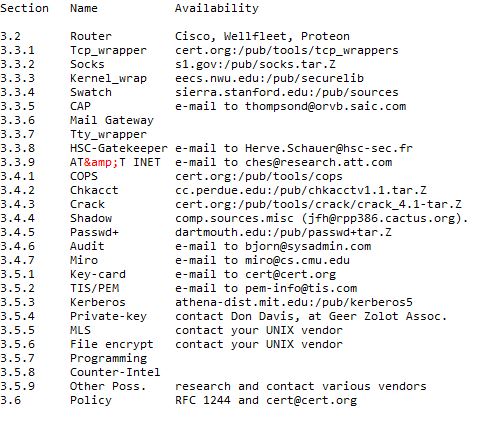
4. SUMMARY OF AVAILABILITY
5. ADDITIONAL SOURCES OF INFORMATION
There are several primary sources of information that you can tap into (and correspond with) to keep up to date with current happenings in the general network security and in specific the "firewall" community. I recommend subscribing to the following mailing lists: (a) [email protected]; (b) cert-tools- [email protected], and (c) [email protected]. In addition to that read and participate in the following USENET newsgroups: (a) comp.security.announce (which echos the CERT advisory mailing list); (b) comp.security.misc; (c) alt.security (frequently dissolves into "flame wars"); (d) comp.risks; and (e) comp.virus (almost exclusively for discussing PC and MAC viruses). Also, you can copy files from the CERT USENET Clipping Archive via anonymous FTP from cert.org.
CERT Contact Information:
Emergencies:
+1 412 268-7090
FAX: +1 412 268-6989
E-mail: [email protected]
U.S. Mail: CERT Coordination Center
Software Engineering
Institute
Carnegie Mellon University
4500 Fifth Avenue
Pittsburgh, PA 15213-3890, USA
USENIX Papers are available directly
from USENIX
The USENIX Association
2560 Ninth Street, Suite 215
Berkeley, CA 94710, USA
6. Acknowledgements
The author extends thanks to several of the authors of the tools discussed in this paper and others for providing feedback that effected several changes in the first couple drafts of this paper. This includes but, is not limited to the following: Ed DeHart (CERT), Jim Ellis (CERT), David and Michelle Koblas (SOCKS), Herve Schauer (Gatekeeper), Dan Farmer (COPS), D. Brent Chapman ([email protected]), and Matt Bishop (Editor).
February 18, 1993
Robert B. Reinhardt
[email protected]
ARINC Research Corporation
2551 Riva Road
Annapolis, MD 21401
Suggestions for Further Reading
- Common Gateway Interface - CGI
- CRM, Customer Relationship Management
- Data Warehouse and Data Mining Technologies
- Relational Databases
- DHTML Scripts - Resources For Dynamic Websites
- Domain Name Registration Services
- Ecommerce and Online Store Solutions
- Online Marketing Solutions and Promotions
- Essays on Information Technology
- Free Software, Tools and Applications
- Computer and Web Graphics
- HyperText Markup Language
- Html Tools for World Wide Web
- Java Programming language, Tutorials, Tools and Applets
- Javascript Programming
- Computer Networks
- Computer Operating Systems
- OS X Mountain Lion and Parallels Desktop For Mac
- Perl Scripts - Resources for CGI and Perl Programming
- Programming Languages
- Project Management
- Dhtml Scripts, Javascripts, Html Scripts, Perl Scripts
- Search Engines and SEO
- Web design and Website development
- Best Web Hosting Services
- Web Resources and Web Tools
- Web Tools And Web Resources For The Web Masters
- Essays On Dharma
- Esoteric Mystic Hinduism
- Introduction to Hinduism
- Hindu Way of Life
- Essays On Karma
- Hindu Rites and Rituals
- The Origin of The Sanskrit Language
- Symbolism in Hinduism
- Essays on The Upanishads
- Concepts of Hinduism
- Essays on Atman
- Hindu Festivals
- Spiritual Practice
- Right Living
- Yoga of Sorrow
- Happiness
- Mental Health
- Concepts of Buddhism
- General Essays
7. References
[1] S. Carl-Mitchell and John S. Quarterman, Building Internet Firewalls. UnixWorld; February, 1992; pp 93-102.
[2] Wietse Venema. TCP Wrapper: Network Monitoring, Access Control and Booby Traps. USENIX Proceedings, UNIX Security Symposium III; September 1992.
[3] David and Michelle Koblas. SOCKS. USENIX Proceedings, UNIX Security Symposium III; September 1992.
[4] William LeFebvre. Restricting Access to System Daemons Under SunOS. USENIX Proceedings, UNIX Security Symposium III; September 1992.
[5] D. Brent Chapman. Network (In)Security Through IP Packet Filtering. USENIX Proceedings, UNIX Security Symposium III; September 1992.
[6] Stephen E. Hansen and E. Todd Atkins. Centralized System Monitoring with Swatch. USENIX Proceedings, UNIX Security Symposium III; September 1992.
[7] J. David Thompson and Kate Arndt. A Secure Public Network Access Mechanism. USENIX Proceedings, UNIX Security Symposium III; September 1992.
[8] Herve Schauer. An Internet Gatekeeper. USENIX Proceedings, UNIX Security Symposium III; September 1992.
[9] William Cheswick. The Design of a Secure Internet Gateway. Murray Hill, NJ: AT&T Bell Laboratories.
[10] Garfinkel, Simson, and Gene Spafford. Firewall Machines. Practical UNIX Security. Sabastopol, CA: O'Reilly and Associates, Inc., 1991.
[11] Shabbir J. Safdar. Giving Customers the Tools to Protect Themselves. USENIX Proceedings, UNIX Security Symposium III; September 1992.
[12] John F. Haugh, II. Introduction to the Shadow Password Suite. USENIX Proceedings, UNIX Security Symposium III; September 1992.
[13] Matt Bishop. Anatomy of a Proactive Password Checker. USENIX Proceedings, UNIX Security Symposium III; September 1992.
[14] Bjorn Satdeva. Audit: A Policy Driven Security Checker for a Heterogeneous Environment. USENIX Proceedings, UNIX Security Symposium III; September 1992.
[15] Allan Heydon and J.D. Tygar. Specifying and Checking UNIX Security Constraints. USENIX Proceedings, UNIX Security Symposium III; September 1992.
[16] James M. Galvin and David M. Balenson. Security Aspects of a UNIX PEM Implementation. USENIX Proceedings, UNIX Security Symposium III; September 1992.
[17] Don Davis. Network Security Via Private-Key Certificates. USENIX Proceedings, UNIX Security Symposium III; September
(c) Copyright 1992,1993 Robert B. Reinhardt. This paper may be distributabed freely as long as the paper is not modified in any way, includes this notice, and is provided without guarantee or warranty expressed or implied. E-mail comments to [email protected]: Information provided here is for informational purposes and should not be construed as expert advice.